
What if Kasa smart device keeps losing connection or going offline?
 197277
Introduction
There are some circumstances in which Kasa smart devices do not work stably or lose connection from time to time. This could be due to the network environment or other reasons. This article provides helpful tips for fixing the situation.
Troubleshooting
Step 1. Ensure the main router is working properly. Reboot the router and the Kasa device, then see if the smart device reconnects.
Step 2. Ensure the Kasa smart device is receiving a good Wi-Fi signal by checking RSSI (Received Signal Strength Indicator) via the Kasa app > tap  in the left top > Device Settings > Device info > tap the Wi-Fi icon to see the signal strength (RSSI value).
- Strong: more than -50 dBm
- Good to Average: among -70 dBm to-50 dBm
- Poor: less than -70 dBm
Note: If RSSI is below -70 dBm, the signal is too weak; the device may disconnect. Relocate the smart device or router to get a stronger Wi-Fi signal.
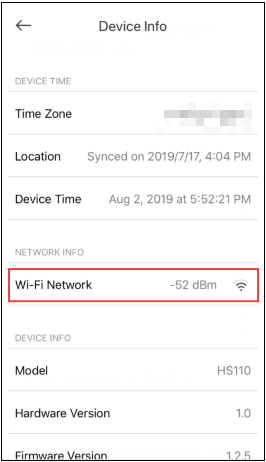
Step 3. Update the firmware of the Kasa device.
Step 4. Ensure the Kasa app is up to date in the App Store or Google Play.
Step 5. Turn off Advanced Wi-Fi settings on the router, such as Band Steering (also called Smart Connect or Whole-Home Wi-Fi), Wi-Fi Optimizing, or Channel optimization, etc.
Step 6. (Optional) Try to configure the smart device to another router’s 2.4G Wi-Fi or a mobile Hotspot Wi-Fi to verify whether this issue is related to the specific router.
If the issue is still the same, contact TP-Link technical support and provide the information below for our support to look into further:
- Led status on a smart device when it is offline: Red/ Flashing Green/ Solid Green, etc. (For Kasa plug)
- MAC address of the device
- TP-Link ID email address
- When an issue occurs, does the smart device work in the local network? For the test, connect your mobile device to the home Wi-Fi network at that time and check whether the Kasa device is still accessible on the local network.
- The model number of the Wi-Fi router and your network topology. e.g. ISP Spectrum-Archer C7 router<Wireless> Kasa device
- How often does the issue happen, and how does it recover the connection, like rebooting the smart plug or rebooting the router?
Is this faq useful?
Your feedback helps improve this site.
一级列表页_normal_1591582218771p.png)



TP-Link Community
Still need help? Search for answers, ask questions, and get help from TP-Link experts and other users around the world.