
What should I do if Kasa KE100 is overheating or not heating?
 1215
1215Introduction
You may encounter heating issues with the Kasa KE100, such as continuous overheating above the set temperature, persistent temperature fluctuations, or difficulty reaching the desired temperature due to a lack of heating response. These behaviors can result from various factors related to installation, configuration, or the heating environment. This FAQ provides general guidance on troubleshooting KE100 heating issues.
Troubleshooting
Step 1. Keep device's firmware updated.
Step 2. Test whether the KE100 motor is working properly by following the steps below:
- Set the target temperature to 30°C via the app or by rotating the KE100. Check whether the LED indicator flashes and whether the motor produces any sound.
- Turn off the device in the app, observe again for LED activity and motor noise.
- If there is no LED indication or motor response during these steps, refer to the information provided at the end of this article and contact Support for further assistance.
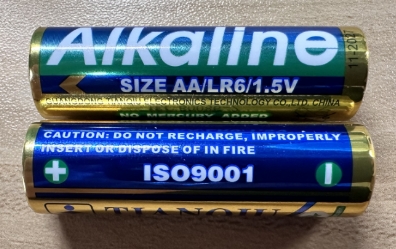
Step 3. Make sure you are using the AA LR6 1.5V Alkaline batteries
Note: Do NOT use rechargeable batteries, R6, Zn-C, or 1.2V AA batteries.
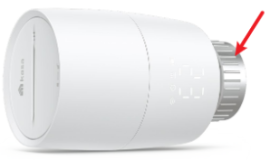
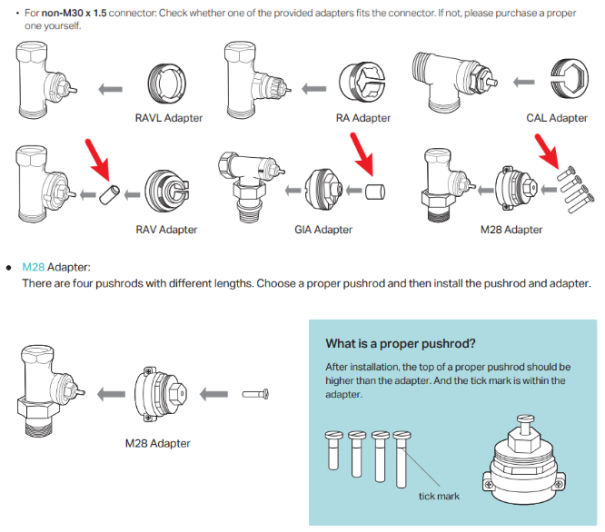
Step 4. Check whether your thermostat valve is compatible with KE100. If the valve doesn't fit with KE100's connector or the included adapters, refer to the compatibility guide and purchase a suitable adapter.
Step 5. Make sure KE100 is installed correctly.
Note:
- KE100's connector needs to be tightened securely.
- Double-check whether the adapter is installed correctly. Do not forget the pushrod if you use the RAV/GIA/M28 adapters.
Step 6. Reinstall & Recalibrate
- Before reinstallation, go to Kasa app > KE100 Device Settings > Enable Sleep Mode > Select Fully Open.
- Disassemble the KE100 and reinstall it.
- Reset KE100 by pressing and holding the Sync/Reset button for 5 seconds.
- Add/Setup device back to Kasa app.
- Once installed, recalibrate KE100 in Kasa app > KE100 Device Settings > Calibration page.
Please contact TP-Link technical support with the following information if you still encounter issues after the above suggestions.
- Mac address of the KE100.
- Some screenshots of the temperature Report in the app showing the abnormal phenomena.
- Model/type of your thermostat valve.
- A picture of the batteries or a link. It should include all information about the battery, such as brand, size, battery type, and voltage.
Example:
Is this faq useful?
Your feedback helps improve this site.


TP-Link Community
Still need help? Search for answers, ask questions, and get help from TP-Link experts and other users around the world.